What Is Shoppable Video? Definition, Examples and How It Works
 Yash RanadiveFounder & CEO of Videoselz · 4 min read
Overview
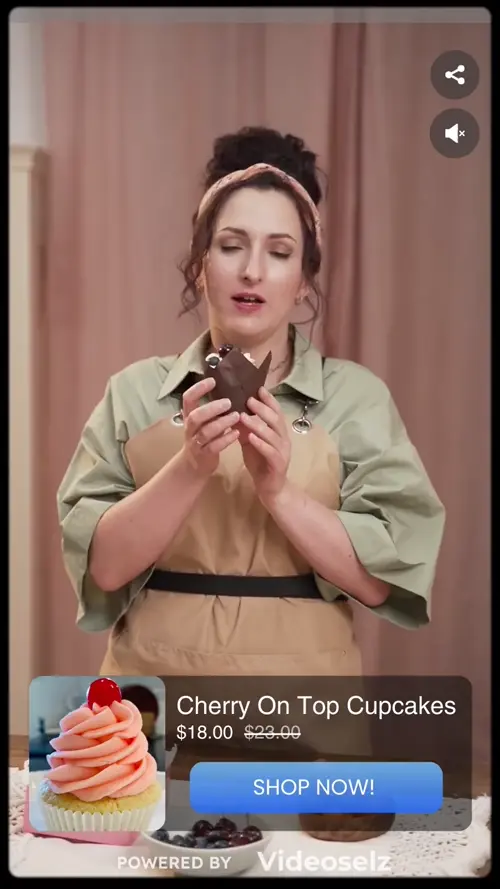
Shoppable video is a video that lets viewers buy the products in it without leaving the video. The products are tagged inside the player, so a shopper who likes what they see can open the product, choose a size and add it to cart without leaving the video.
On a Shopify store, shoppable video usually means short, vertical clips — TikToks, Instagram Reels and customer videos — placed on product pages, collections and the homepage. This guide explains how it works, how it differs from an ordinary product video, the formats you'll see, and what real stores have measured.
How does shoppable video work?
A shoppable video works by linking a video to products in your catalog. A shoppable video app does three jobs:
- Hosts the video — uploaded, or imported from TikTok or Instagram.
- Tags products — you attach one or more Shopify products to each video. Price, images and stock stay in sync with your catalog.
- Plays it on your store — in a widget such as a carousel. When a shopper taps a video, it opens in a fullscreen player with the tagged products on screen and an add-to-cart button.
The shopper never leaves the page they were on. That's the whole point: the moment of interest and the moment of purchase happen in the same place.
How is shoppable video different from a regular product video?
A regular product video shows the product; a shoppable video also sells it. The difference is what happens when the shopper is interested.
| Regular product video | Shoppable video | |
|---|---|---|
| Next step for the shopper | Close the video, find the product, add to cart | Tap the product in the video and add to cart |
| Products per video | Usually the page's own product | Any number of tagged products |
| Typical source | Studio-shot brand video, often on YouTube | TikToks, Reels and customer clips |
| What you can measure | Plays | Views, add-to-cart actions and sales per video |
What are the main shoppable video formats?
Most shoppable video apps offer the same handful of formats, each suited to a different spot on the store:
- Carousel: a row of video cards — the default for product and collection pages.
- Stories: Instagram-style thumbnails, usually at the top of the homepage.
- Slider or banner: one large video as a homepage hero.
- Popup and floating video: a small player that appears or stays on screen, for campaigns.
- Fullscreen player: what opens when a shopper taps any of the above, with the products on screen.
Shoppable video examples from Shopify stores
The clearest way to understand shoppable video is to see what it did for real stores. These are Videoselz customers; each figure links to its full case study.
- Cupid Intimates, an 80-year-old shapewear brand, used video to show how garments perform in motion. Result: a 6.7% conversion rate — 49% above the store's average — across 6,190 engaged sessions, with 415 influenced orders.
- Lucia, an Australian sleepwear and loungewear brand, showed fabric, drape and fit in motion. Result: an 11.1% conversion rate and a 95.1x ROI.
- Gina's Woofs, a Slovenian dog apparel brand, showed its raincoats and bandanas in motion. Result: 877 add to carts, 170 orders and a 20.35% conversion rate.
- Owltra, a US brand of electronic rodent and insect traps, used video to demonstrate how its traps work. Result: a 6.0% conversion rate and a 12.7x ROI.
The pattern is the same in every case: the video answers a question a photo can't — how it fits, how it moves, how it works — right where the shopper decides.
Prefer to hear it from a merchant? Watch Julie Higgins of Cupid Intimates talk through their results.
How do you measure shoppable video?
Measure it on sales, not plays. Track these per video and per placement:
| Metric | What it tells you |
|---|---|
| Views | Whether the video gets watched where you placed it |
| Product clicks | Whether the video makes shoppers curious about the product |
| Add-to-cart actions | Whether the video moves shoppers to buy |
| Orders and conversion rate | Whether video sessions turn into sales |
| ROI | Revenue from video sessions against what the app and content cost |
Videoselz shows views, add-to-cart actions and sales in real time, and per-product impressions, clicks and add-to-carts for each tagged product — see analytics.
How do I add shoppable video to my Shopify store?
Install a shoppable video app, import or upload a few videos, tag your products and add the app's block to your theme. With Videoselz the first video is live in about five minutes:
- Install Videoselz from the Shopify App Store (free plan available).
- Import your TikToks or Instagram Reels, or upload MP4/MOV files.
- Tag the products in each video.
- Add the Videoselz block to your product page in the theme editor.
Step-by-step guides: quick start, adding TikTok videos and adding Instagram Reels. Comparing apps first? Read the 7 best shoppable video apps for Shopify.
Frequently asked questions
What is shoppable video?
Shoppable video is a video that lets viewers buy the products in it without leaving the video. Products are tagged inside the player, so a shopper can open a product and add it to cart from the video.
Is shoppable video the same as a video ad?
No. A video ad runs on another platform and sends people to your store. Shoppable video usually lives on your own store, where shoppers can buy the tagged products directly from the video.
Does shoppable video increase conversion rates?
It can. Among Videoselz customers, Cupid Intimates reached a 6.7% conversion rate (49% above its store average), Lucia 11.1% and Gina's Woofs 20.35%. Results depend on your products, videos and placement, so measure add-to-carts and orders per video.
Can I use TikTok and Instagram videos as shoppable videos?
Yes. Most shoppable video apps import TikToks and Instagram Reels by link, profile or hashtag. Use your own videos, or creators' videos you have permission to use.
What makes a good shoppable video?
Short, vertical clips that show the product in use within the first few seconds: fit, movement, texture, or how it works. Keep product showcases under about 30 seconds and tag every product that appears.
How much does shoppable video cost on Shopify?
Many apps have a free plan. Videoselz's free plan includes unlimited video views and multi-product tagging, and Pro is $13.99 a month. Other apps price by views, viewers or impressions, so compare plans at your traffic.